n4patch: Expand the Track Limit to 255 in NFS4 High Stakes
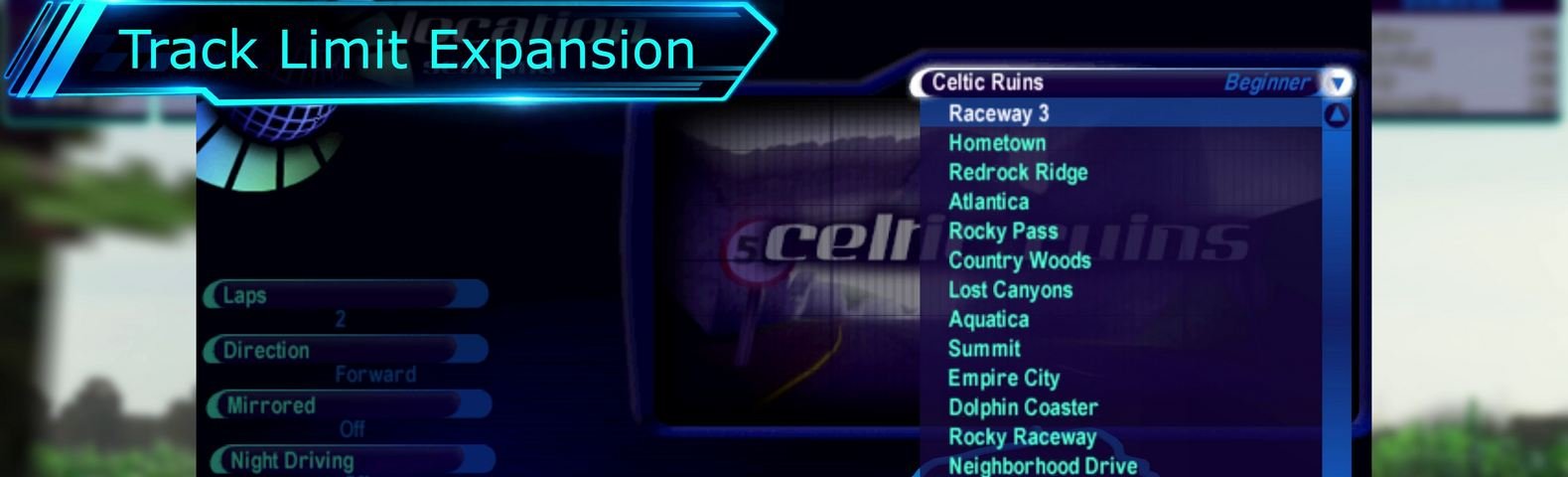
Track Limit Expansion: Up to 255 Tracks in Need for Speed: High Stakes (1999)
Track Limit Expansion (track_limit.n4p) is an n4patch module that increases the original track limit in Need for Speed: High Stakes from 19 to 255 tracks.
Additional tracks are integrated into the original game interface, including the track selection menu, track information screen, and records system.
Beyond expanding the track limit, the module automatically generates missing track artwork and 3D route models, and introduces independent record storage for different race conditions.
Features
- Up to 255 Tracks: Add custom tracks without replacing the original ones.
- Original Interface Integration: Additional tracks appear in the standard track selection menu and information screens.
- Automatic 3D Route Generation: Generate three-dimensional track previews from VRoad data.
- Automatic 2D Map Generation: Create route maps for the track information screen.
- Automatic Vidwall Generation: Generate track preview images matching the original game's visual style.
- Automatic Loading Slides: Generate loading screens featuring a 3D representation of the track.
- Independent Track Records: Each track stores its own records in its directory.
- 16 Record Categories: Separate records for combinations of time of day, driving direction, mirrored mode, and weather.
- Tournament and Knockout Support: Custom tracks can be included in standalone tournament schedules.
- Replay Support: Correctly display additional track information when loading replays.
- INI Configuration: Configure the track count, names, directories, and additional parameters.
Video: https://youtu.be/fQ-1FpoHtLY
Automatic Asset Generation
The original game uses several separate resources to display track information, including a 3D route model, a 2D map, a Vidwall preview, and a loading slide.
These resources are often missing from custom tracks.
The n4patch module can automatically generate them using the track data:
| Resource | Generated File |
|---|---|
| 3D Route | _n4route.viv |
| 2D Map | _n4map.qfs |
| Vidwall | _n4vidwall.qfs |
| Loading Slide | _n4slide.qfs |
Generated files are stored directly in the track directory and reused on subsequent game launches.
Assets are generated only when the corresponding resources are missing. Existing original artwork and custom files always take priority and are never overwritten.
To regenerate an automatically created asset, simply delete the corresponding _n4* file and restart the game.
New Records System
The module changes how records are stored in NFS4.
Instead of using the shared SaveData\records.dat file, every track, including the original ones, now uses its own record file:
Data\Tracks\<dir>\RECORDS.N4R
Each track has 16 independent record categories based on four race settings:
- Day or Night.
- Forward or Reverse direction.
- Normal or Mirrored track.
- Dry or Rainy weather.
For example, records set during daytime and nighttime races on the same track are now stored separately.
New lap records are saved immediately when they are set, rather than only after the race finishes. This allows a new record to survive a subsequent race restart, provided the save completed successfully.
Record files use a binary format with integrity checks and safe file updates.
Please note: Existing records from the original records.dat file are not automatically imported.
Configuration
The module is configured through n4tracklimit.ini, located next to nfs4.exe.
Example:
[track_limit]
count=20

[track19]
dir=MYTRACK1
name=My Track 1
difficulty=Intermediate
Here, count=20 specifies the total number of tracks, including the original 19, while the [track19] section defines an additional track.
For most custom tracks, there is no need to manually specify a base track or frontend resources. The module attempts to detect them automatically.
The maximum supported track count is 255.
Installation
- Install a compatible n4patch loader.
- Place
track_limit.n4pin the game'sn4patch/directory. - Copy
n4tracklimit.ininext tonfs4.exe. - Configure the track count and additional track settings.
- Start the game.
Check n4patch.log to verify that the module has loaded successfully.
The module requires a loader supporting Loader Info API v1.
The original game executable is not modified. All necessary changes are applied directly in memory by the loader at startup.
Important
This module is designed for Need for Speed: High Stakes (1999), PC and requires a compatible n4patch loader.
Before using it, we recommend backing up your game profiles, save files, and records, especially if you are using other modifications.
For more information and updates, visit https://nfs4.com.
Changelog
v1.5.0 (October 17, 2026)
- Fixed an issue where track unlock progress could be lost, preventing some tracks from being selected.
- Added
police_baseto select a stock track as the source for AI police vehicle selection and country-specific liveries. - Added
police_carsto define custom police vehicle lists for additional tracks. - Fixed progress saving in Hot Pursuit races.
v1.6.0 (October 18, 2026)
- Fixed an issue where starting Hot Pursuit could cause the game to crash or prevent police radio communications from playing.
- Added the
traffic_baseparameter to select the original track used as the source for traffic vehicle configurations.
Comments
Collapse thread started by TouIchifu on 2026-10-16
Very nice. But tracks from race way 1 to empire city are being not selectable(grey out) with this plugin enabled in my game.
Collapse thread started by Herms on 2026-10-16
Its possible that these tracks may need to be simply unlocked by playing career mode. On a fresh install they are normally locked (greyed out)
Actually, when I saw the greyed-out tracks during testing, I thought the same thing. I assumed the unlock progress had simply been reset.
Yes, that looks like a bug.
Thanks for reporting it! I'll fix it :)
Collapse thread started by lnikonl on 2026-10-17
Fixed! And I've also added police support :)
Thanks again for reporting this. I completely overlooked it.
Since the first version of the patch modified
RECORDS.DATdirectly, I assumed the track unlock progress had simply been reset. So I used another patch to force-unlock all tracks and cars while testing :)That's why I missed the issue.
Thanks for the fix. am looking forward to the car limit expand!
Collapse thread started by TouIchifu on 2026-10-17
I guess I have found some incompatibilities. The GST(ghost) files created by Cheat Engine will crash on the loading screen if the game mode in the GST file is set to [hot pursuit]. It occurs with original tracks as well.
Was this GST file created with the patch installed, or before installing it?
The problem might be related to how police cars are identified.
I've never used GST files this way before, so I'll need to do some testing.
Thanks for letting me know!
Collapse thread started by lnikonl on 2026-10-17
Unfortunately, I don't know much about editing FST files. I tried using the table in CE, but couldn't figure out the right parameters. It would be helpful if I could get a file that causes the crash, though we'd need to figure out how to share it.
Collapse thread started by TouIchifu on 2026-10-17
Here are some links for testing. GST Editor (Cheat Table): https://www.nfsaddons.com/downloads/nfshs/tools/7311/gst-editor-cheat-table.html Example 1 (hot pursuit): https://drive.google.com/file/d/1J5AWrqg0NA2EL_l0TqGl9VU0V_DrANWy/view?usp=drive_link Example 2 (single race) : https://drive.google.com/file/d/1XZ55ei0mDhnoBhrf9lzliEDCAUNsTse0/view?usp=drive_link
Put the gst files into [Savedata/Saves] and load them as ghosts in the game, where replays are stocked as well. Only Example 2 is working with track limit expansion on, while Example 1 will crash during the load. Hope these links would help you. Sorry for my bad English.
Collapse thread started by lnikonl on 2026-10-17
Thanks for the files!
I tested both examples, but couldn't reproduce the issue.
Both files load successfully on my side, and the races start normally.
Could another mod or patch be causing a conflict?
Collapse thread started by TouIchifu on 2026-10-17
Crash no longer happens after I set up police_base and police_car keys for the new tracks, which has nothing to do with GST. sorry for the confusion. But the police cars on new tracks are suffering from the [track too short] bug and keep driving backwards slowly. I wonder whether it can be solved.
Collapse thread started by lnikonl on 2026-10-17
Glad to hear the issue is resolved! I'll still take a closer look at Hot Pursuit, though.
If you have an example of a track where this happens, I'll take a look.
Collapse thread started by TouIchifu on 2026-10-18
I met with this bug on these two tracks which are actually longer than their conuterparts. https://www.nfsaddons.com/downloads/nfshs/tracks/3165/lake-diabolo.html https://www.nfsaddons.com/downloads/nfshs/tracks/8708/coal-harbour.html
Here is the additional lines in n4tracklimit.ini
[track19] dir=Coalharbor name=Coal Harbor difficulty=expert base=18 res=19 loc=297 police_base=empire police_cars=503,32
[track20] dir=Lake name=Lake Diabolo difficulty=begineer base=16 res=20 loc=297 police_base=aquatica police_cars=503,32
Thanks! That's great! My game crashes when starting Hot Pursuit on Coal Harbour, so this should help me track down the issue.
It looks like the problem might be related to the police voice audio.
In addition, the bug is being demonstrated in this video, but the fix is not public I guess. https://www.youtube.com/watch?v=hB18706s8dU
Sometimes a GST file becomes corrupted when it's been rewritten many times over, causing a crash. I don't know why it happens, but when it does, creating a fresh gst file from inside the game and using it to edit via the GST Editor usually eliminates those issues.
Collapse thread started by Zalcus20 on 2026-10-17
A truly amazing work you have done here, friend. Great Job! Especially thanks for the update! I did find 2 more issues while testing your mod (without other plugins/patches installed):
On the extra installed tracks, the local cop speech is broken. There is skipping in dialogue and they never state their location. It still happens even after setting the locidx=xx command in the ini file. Is this a potential bug? I know you're not focused on Hot Pursuit mode but if you can look into this, that would be great!
All the extra tracks load the exact same model traffic car. This means a traffic table needs to be defined for each of these extra tracks. DrSpeed discovered and shared the info on these traffic tables here(see DrSpeed's first comment on this page): https://www.nfsaddons.com/forums/index.php?topic=2646.0 Maybe you can implement an option in the ini file where this info is copied from an extra track's base track similar to how you did the police_base command in the ini file.
Thanks for keeping NFSHS alive! I look forward to seeing more of your work. Hope we will be able to see a car list with 500 cars one day! :D
Thanks! I'll look into both issues.
I'll get back to the car limit expansion patch once I'm done with the tracks and textures.
Collapse thread started by lnikonl on 2026-10-18
Thanks! Looks like I've managed to fix both issues!
Collapse thread started by Zalcus20 on 2026-10-18
Thanks for the update! You solved the traffic issue perfectly. :)
However, I am still getting the first issue with the locidx cop speech, unfortunately. Setting locidx still seems to have no effect on which cop audio gets loaded, and the cop dialogue is still skipping/not making sense/not stating their location.
I tested to see whether the issue is something on my end, but after testing with a separate, clean install of NFSHS, this issue still persists. If you want to see if the problem is replicated on your end, load a getaway hot pursuit mode as a cop and listen to what dispatch says.
On the stock tracks, the first message dispatch usually says is something like "All units be advised, be on the lookout for a sportscar". (as you probably already know) However, with the extra tracks the bug causes dispatch to only say, "All units be advised--" not completing the rest of the sentence. There are other bugs in the dialogue when playing the Getaway mode. This is just one example.
But overall this is amazing! You have made many dreams come true with your achievements. Please keep up the excellent work! :thumbsup:
Thanks for the detailed report!
You're right, I really haven't paid enough attention to Hot Pursuit. I don't think I've even tried playing as a cop.
I did hear some police radio chatter in the regular HP modes, but since I didn't really play Hot Pursuit, it was hard to notice that some of it was missing.
Looks like it's time to test it more thoroughly! :)
Found and fixed!
Please try v1.6.2
Collapse thread started by Zalcus20 on 2026-10-19
Yes, yes! You did it, friend! Police dialogue is indeed fixed. It is coherent and no more skipping! :D I like the creative fix you did for the opening dispatch dialogue on the extra tracks. Nice touch. :) And that is just genius having the ability to choose which speech banks are loaded for the extra tracks. ;)
The issue with cops not reporting their location still exists, but I realize this has nothing to do with the n4patch, but rather is connected to an age old problem with the game itself, infamously known as the ''track too short bug". TouIchifu touched on this earlier.
This bug happens on the Raceway tracks if you try to force hot pursuit mode to be used on them. Since no location speech banks exists for those tracks, there is:
nothing for the cop dialogue to say in regard to their location, and
as mentioned by Toulchifu, the ai cops that are driving in the opposite direction of the player do not turn around to chase the player when they initiate pursuit. They continue to pass the player and drive in that direction until visual contact is broken.
So, apparently this is what happens to the extra tracks that are introduced to the game.
I'm sorry about these long posts. I thought it would be a good idea to share these infos with you just in case one day you decide to investigate other game modes besides Career and start bumping into these issues.
TL;DR: Your update fixed the main issue, (police dialogue). The other issue (no location speech) is a result of the "track too short bug" an age old NFS High stakes problem. It is not a symptom of the n4patch. ;)
Thank you again! You have a new fan! -Zalcus20
It's good to report these issues.
Sometimes, while investigating one problem, I might come across another one and fix it along the way, even if I was working on something else at the time. :)
Yes, I know about the "player backdrive" issue (or when the player drives in the wrong direction). I'll need to investigate the AI logic in more detail to fix it. That one is still waiting its turn.
I've also heard about the "track too short bug", but I haven't looked into it yet. Maybe it'll be easier to fix than the first one.
Log in to leave a comment and rate. Log in