CLI редактор car.viv (для NFS4:HS)
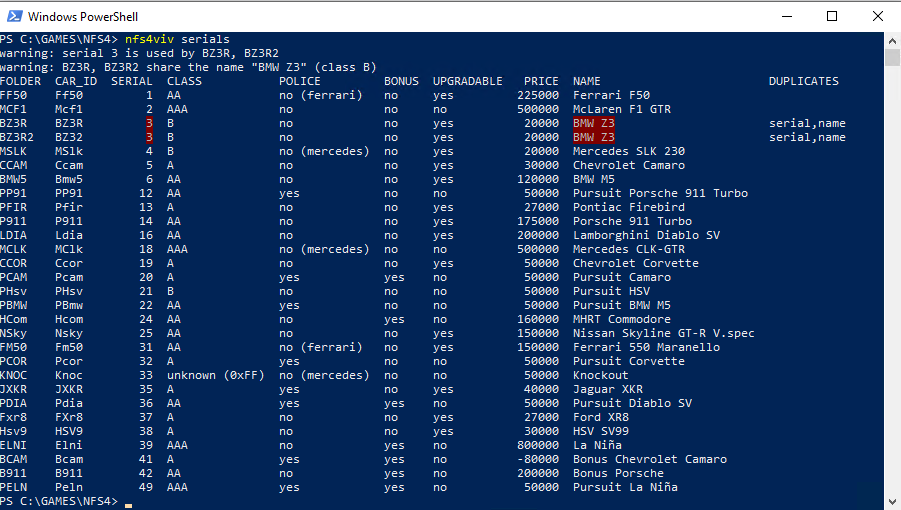
Утилита командной строки для редактирования текстовых данных машин игры Need for Speed 4: High Stakes (NFS 4: HS).
Эта специализированная утилита предназначена для удобного просмотра, изменения и сохранения внутренних текстовых данных, содержащихся в файлах конфигурации автомобилей (car.viv).
Сделал в рамках тестирования расширения поддержки более чем 49 машин в игре.
Нужно было быстро посмотреть есть ли дубли в serial, какие машины игра должна видеть и их названия.
Ключевые особенности:
- ClI интерфейс
- Возможность обновления данный в fedata сразу для всех языков
- Быстрый анализ папки CARS на наличие дублей
- Быстрое изменение данных fedata
- Экспорт/импорт в json
Простой пример:
nfs4viv fedata set .\DATA\CARS\BZ3R2\CAR.VIV --lang all car_id BZ32 serial 7 car_name "BMV Z3 II"
Утилита в разработке, по найденым проблемам и ошибкам пишите в комментрариях.
README.md
nfs4viv
nfs4viv reads and edits Need for Speed 4 car.viv archives and the fedata
files inside them. It can list and check car serial numbers, change any
textual or numeric fedata field in one or all localizations, and export or
import the data as JSON. The VIV (BIGF) container and the NFS4 fedata layout
match the ones documented by VivLib and
used by Vivianne.
Main repository
https://github.com/lnikonl/nfs4viv
Build
Requires Go 1.24 or newer.
make build          # bin/nfs4viv (linux/amd64)
make windows        # bin/nfs4viv.exe (windows/amd64)
make dist           # bin/ plus release archives in dist/
make test           # go test ./...
Without make, ./build.sh builds both binaries and the archives. VERSION
is embedded into the binary and used in the archive names; it defaults to
dev. Linux ships a nfs4viv-<version>-linux-amd64.tar.gz, Windows a
nfs4viv-<version>-windows-amd64.zip; every archive contains the binary,
README.md and LICENSE. The archives are written by cmd/packdist, so no
external archiver is required.
Testing
make test (or go test ./...) runs the synthetic fixtures from cartest.
The same run also exercises the export/import round trip against original car
samples when they are materialized under original/nfs4viv/DATA/CARS; that
test skips itself when the folder is missing, so it is safe to run anywhere.
CI on the private GitLab fetches the data-only gitlab/original-data branch
and runs the tests a second time with the samples in place.
Commands
# List every car found in a game cars folder. Each subfolder (car00, car01,
# ...) is expected to hold a car.viv archive. Without DIR the command scans
# ./DATA/CARS relative to the working directory.
./nfs4viv serials "C:\Games\NFS4\DATA\CARS"
./nfs4viv serials
./nfs4viv serials -sort class
./nfs4viv serials -check-off
./nfs4viv serials -json -lang ger "C:\Games\NFS4\DATA\CARS"

# Print every editable text and numeric field of a fedata file, either read
# directly or from inside a VIV archive.
./nfs4viv fedata show "C:\Games\NFS4\DATA\CARS\car07\car.viv"
./nfs4viv fedata show -json -entry fedata.eng ./car.viv

# Change one or more fedata fields. The VIV is repacked in place; -o writes a
# copy instead. Values are applied left to right.
./nfs4viv fedata set "C:\Games\NFS4\DATA\CARS\car07\car.viv" serial 12
./nfs4viv fedata set "C:\Games\NFS4\DATA\CARS\car07\car.viv" -o patched.viv car_name "Ferrari F50 GT" price 500000
./nfs4viv fedata set ./fedata.eng bonus yes upgradable no

# Apply the same change to every localization stored in the archive.
./nfs4viv fedata set -lang all "C:\Games\NFS4\DATA\CARS\car07\car.viv" serial 12 car_name "Ferrari F50 GT"
./nfs4viv fedata show -lang all "C:\Games\NFS4\DATA\CARS\car07\car.viv"

# Export/import the editable fields as JSON (one entry or all languages).
./nfs4viv fedata export -lang all -o car.json "C:\Games\NFS4\DATA\CARS\car07\car.viv"
./nfs4viv fedata import -lang all "C:\Games\NFS4\DATA\CARS\car07\car.viv" car.json
./nfs4viv fedata export "C:\Games\NFS4\DATA\CARS\car07\car.viv" > fedata.json
./nfs4viv fedata import "C:\Games\NFS4\DATA\CARS\car07\car.viv" < fedata.json

# List every field accepted by show and set.
./nfs4viv fedata fields

# Generic VIV utilities.
./nfs4viv viv ls ./car.viv
./nfs4viv viv read ./car.viv fedata.eng -o fedata.eng
./nfs4viv viv extract ./car.viv -o ./extracted
./nfs4viv viv replace ./car.viv dash.qfs ./dash.qfs
./nfs4viv viv add ./car.viv extra.bnk ./extra.bnk -o new.viv
./nfs4viv viv rm ./car.viv extra.bnk
replace, add and rm overwrite the input archive unless -o is given.
Every write is atomic: the output is assembled next to the target and renamed
over it. serials prints duplicate serial numbers and serial 0 as warnings on
stderr, so stdout stays machine readable.
A fedata file exists in several localizations (fedata.eng, fedata.ger,
...). -lang EXT picks one of them (eng, bri, fre, ger, ita, spa,
swe); when omitted, the first available one is used. -lang all is
supported by fedata show and fedata set: it reads or updates every known
localization present in the archive, so a single command can rename a car or
change its serial number in all languages at once. With -lang all, a JSON
fedata show writes an array of objects (one per localization) and fedata set reports how many entries were updated. serials always reads one
localization per car and rejects -lang all.
serials output
For each car the command reads the first available fedata entry (fedata.eng,
fedata.bri, ... unless -lang selects one) and prints the folder, the four
character car ID, the serial number, the car name, the performance class
(AAA, AA, A, B), the police and bonus flags, career upgradability and
the base price:
FOLDER  CAR_ID  SERIAL  CLASS  POLICE  BONUS  UPGRADABLE   PRICE  NAME
car00   F50          1  AAA    no      no     yes         350000  Ferrari F50
car01   M5           6  A      no      no     yes          75000  BMW M5
car02   COP1        16  B      yes     no     no               0  Police Cruiser
With -json the same data is written as an array of objects and also includes
the price_text string, the raw flag values and the roof type. Duplicate
checking is enabled by default and appends a DUPLICATES column; -check-off
removes it (see below).
Sorting
-sort COLUMN selects the first sort column (default serial). Accepted
columns are folder, car_id, serial, class, police, bonus,
upgradable, price and name. The class column sorts B, A, AA,
AAA; names sort case-insensitively and numbers ascending. Class is always
used as the second key and name as the third unless they are selected
themselves, so sorting by bonus, for example, yields bonus cars grouped by
class and name.
Checking duplicates
Duplicate checking is enabled by default; -check-off (or -check=false)
disables it, including the stderr warnings. When enabled, it marks cars that
share a serial number, a car ID, or a name plus class pair: a DUPLICATES
column (serial, car_id, name or a combination) is added, a duplicates
array is written in JSON output, and the same conflicts are reported on
stderr. The conflicting field itself is highlighted with a red background in
the table (the same style for every kind of duplicate, since the field tells
what collides), so a serial collision highlights the serial of both cars, a
car ID collision highlights both car IDs and a name collision highlights the
duplicated name:
FOLDER  CAR_ID  SERIAL  CLASS  POLICE  BONUS  UPGRADABLE   PRICE  NAME     DUPLICATES
BZ3R    BZ3R         3  B      no      no     yes          20000  BMW Z3   serial,car_id,name
BZ3R2   BZ3R         3  B      no      no     yes          20000  BMW Z3   serial,car_id,name
-color controls the colors: auto (default) enables them only when stdout
is a terminal, always forces them, and never disables them (useful when
the terminal does not understand ANSI escapes or when redirecting output). On
Windows the tool switches the console into virtual terminal mode itself, so
the colors render in Windows PowerShell 5.1, cmd.exe and Windows Terminal
instead of showing raw ESC[...m sequences; if a host still prints escapes
(for example the PowerShell ISE, which has no real console), use
-color never.
JSON output carries no colors; it uses the duplicates array instead:
{
  "folder": "BZ3R",
  "car_id": "BZ3R",
  "serial": 3,
  "name": "BMW Z3",
  "duplicates": ["serial", "car_id", "name"]
}
JSON export/import
fedata export writes a flat, editable JSON document with one key per field
accepted by fedata set, using the same names (car_id, serial, class,
car_name, price, rating_*, ...). Values are written as strings, while
fedata import also accepts numbers and booleans, so the files are convenient
to edit by hand:
{
  "entry": "fedata.eng",
  "car_id": "F50",
  "serial": "1",
  "class": "AA",
  "police": "no (ferrari)",
  "car_name": "Ferrari F50",
  "price": "225000"
}
A single fedata file or entry exports as one object; -lang all exports an
array of objects, each with its entry name. fedata import mirrors that: a
single object updates the selected entry or, with -lang all, every
localization; an array updates only the entries named in it and needs no
-lang, because the entry names select the targets. Unknown entry or field
names are rejected before anything is written. fedata export -lang all
followed by fedata import -lang all is a lossless round trip, including
special values such as police = "no (ferrari)".
Field names
Text fields use snake_case: manufacturer, model, car_name,
price_text, status, weight, weight_distribution, length, width,
height, engine, displacement, hp, torque, max_engine_speed,
brakes, tires, dynamic_stability, top_speed, accel_0_to_60,
accel_0_to_100, transmission, gearbox, history_1..history_8 and
color_1..color_10.
Numeric fields:
| Field | Meaning |
|---|---|
car_id |
Four character car ID. |
serial |
Car serial number (uint16). |
class |
AAA, AA, A, B or 0..3. |
police |
yes, no, no_mercedes, no_ferrari or a raw flag. |
bonus |
Bonus car flag. |
upgradable |
Career upgradability (stored inverted in the file). |
dlc |
Downloadable content flag. |
roof |
solid, convertible, no_roof or 0..2. |
engine_location |
front, mid, rear or 0..2. |
price |
Base price; upgrade_1_price..upgrade_3_price hold upgrade prices. |
rating_acceleration, rating_top_speed, rating_handling, rating_braking, rating_overall |
Default compare table values (0..20); a _1, _2 or _3 suffix selects an upgrade level. |
Boolean fields accept yes/no; numbers accept decimal or 0x-prefixed
values.
The police field is the high nibble of the fedata flag byte. Only 0x10 marks
a real police car; no_mercedes (0x20) and no_ferrari (0xA0) are
non-police cars whose flag keeps a manufacturer-specific value used by the
game, so police = no (ferrari) means "not a police car, Ferrari variant of
the flag".
Format notes
A VIV archive starts with the BIGF magic, a big-endian total length, an
entry count and a data pool offset, followed by directory entries (big-endian
offset and length plus a null-terminated name) and the data pool. Rewriting an
archive recalculates both the entry offsets and the pool offset.
An NFS4 fedata file is a 0x3C0-byte header followed by a string offset table
and a Latin-1 string pool. The header fields edited by nfs4viv are:
| Offset | Type | Field |
|---|---|---|
+0x112 |
byte[4] |
Car ID. |
+0x31E |
uint16 |
Serial number. |
+0x37A |
byte |
Pursuit flag (bits 0xF0) and bonus flag (bit 0x01). |
+0x37B |
byte |
Upgradable (bit 0x40, clear means upgradable), roof (0x03) and DLC (bit 0x04). |
+0x382 |
byte |
Car class. |
+0x389 |
byte[20] |
Five compare tables of four bytes (default, upg 1..3). |
+0x39E |
int32[4] |
Base price and the three upgrade prices. |
+0x3BB |
byte |
Engine location. |
+0x3BE |
uint16 |
String entry count (41 for NFS4). |
All other header bytes, including padding and unknown fields, are preserved.
Repository layout
cmd/nfs4viv/   command line interface
cmd/gendata/   writes the synthetic fixtures to a folder
viv/           BIGF VIV archive reader/writer
fedata/        NFS4 fedata file reader/writer
carviv/        car folder scanning and duplicate detection
cartest/       synthetic car fixture generator
appinfo/       version and copyright metadata
The repository contains no original game assets. Tests and manual experiments
use fixtures generated by cartest: archives with the same structure as the
real files (a CAR.VIV with seven fedata localizations plus stand-in blobs
for geometry, textures and audio) but with data produced locally from a seed.
To materialize a sample DATA/CARS tree for trying the tool out, run
go run ./cmd/gendata            # writes ./DATA/CARS
go run ./cmd/gendata /tmp/cars  # or a chosen folder
License
MIT
Главный репозиторий: https://github.com/lnikonl/nfs4viv
Комментарии
For serials: add MAKER column and add scan SAVEDATA/CARS by default
Войдите, чтобы оставить комментарий и оценить. Войти