What's new
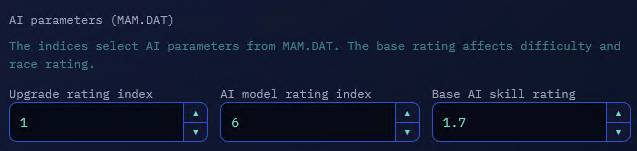
AI parameters have been added to the event settings. They determine how strong the opponents will be, which cars they will receive, and whether their cars will be upgraded.
The settings specify an index in the MAM.DAT file. Each indexed parameter points to a row in that file. A row contains three values: the lower bound, the central value, and the upper bound. The game uses them to randomly select a value within the specified range. The higher the selected values, the more often stronger variants will appear.
AI parameters

Upgrade rating index
Determines how the game configures the condition and upgrades of opponent cars after selecting them.
Lower values in a MAM.DAT row more often result in no upgrade being applied to the cars, while higher values result in higher upgrade levels. This parameter does not select the car model.
AI model rating index
Affects the selection of an opponent car from the cars allowed in the event.
The game first applies the event restriction, such as a class, model, or manufacturer, and then orders the eligible options from weaker to stronger. The index selects a position in this list:
- lower values more often select the weaker end of the list;
- middle values more often select the middle;
- higher values more often select the stronger end.
This parameter therefore lets you make opponents noticeably weaker or stronger without changing the car restriction itself.
Base AI skill rating
Sets the overall difficulty of the opponents and affects the race rating.
Unlike the indices, this parameter does not select an individual car. It sets the base level at which the game configures AI behavior during the race. The higher the value, the higher the overall difficulty.
Technically, these are thresholds, but the fractional part is also used, so 2.9 appears to be the maximum difficulty level.
base < 1.0        -> difficulty 0
1.0 <= base < 2.0 -> difficulty 1
base >= 2.0      -> difficulty 2
For High Stakes, the value is additionally increased based on the number of previous wins:
wins == 0 -> no increase
wins == 1 -> +1
wins >= 2 -> +2
the result is capped at 2
How MAM.DAT works
The index is a row number, not a percentage or a ready-made difficulty level. For example, index 5 refers to the row with values 34, 50, and 66. The game more often selects values closer to the center, but the result can be anywhere from 34 to 66.
Available rows:
| Index | Minimum | Center | Maximum |
|---|---|---|---|
| 0 | 1 | 26 | 99 |
| 1 | 1 | 51 | 99 |
| 2 | 1 | 17 | 33 |
| 3 | 1 | 99 | 99 |
| 4 | 50 | 75 | 99 |
| 5 | 34 | 50 | 66 |
| 6 | 75 | 99 | 99 |
| 7 | 34 | 50 | 66 |
| 8 | 67 | 83 | 99 |
| 9 | 67 | 83 | 99 |
| 10 | 67 | 83 | 99 |
Rows with identical values produce the same result, so indices 5 and 7, as well as 8, 9, and 10, work identically.
Configuration examples
For a relaxed start to a career, choose a low value for the model rating. The game will then more often select weaker cars from the allowed list.
For a difficult championship, choose a high value. In this case, stronger cars will appear more often in the allowed list.
If you need to change the opponents' overall behavior during a race rather than the participant lineup, use Base AI skill rating. The indices control selection and configuration, while the base rating controls the overall difficulty level.
The new parameters let you configure these aspects independently. For example, you can keep strong cars but change their upgrade level using the upgrade rating index, or increase the overall difficulty without changing the list of allowed models.
- Races 1 and 2 have a separate starting rule: if the profile has not yet unlocked any events other than the first one, upgrades above the base level are excluded. A new profile therefore does not encounter upgraded car variants in the first two races.
** For the final race (#32), the usual filtering is replaced with a special set of cars:
Mercedes CLK-GTR
McLaren F1 GTR
Bonus Porsche
Comments
No comments yet.
Log in to leave a comment and rate. Log in